Criteo Ads账户目标选择及搭建方案
Last updated on January 1, 2024 pm
Criteo不同投放目标使用方案
本文内容来自Criteo Support团队,仅供学习,不支持转载
Criteo 广告展示流程介绍
用户浏览网页
Criteo引擎学习用户在广告主网站的交互深度,购买行为与产品偏好等:
• 学习用户在不同设备/浏览器/APP上的完整浏览、购买过程。
• 在用户交互与购买的过程中,发现用户最感兴趣的产品(爆品,加购最多,交叉销售等120+信号)
完善的埋点与商品目录是重中之重,是Criteo引擎能够学习到正确信息的基础。用户访问媒体端页面
用户访问媒体端页面
用户离开广告主网站后,来到Criteo接入的公开互联网平台(对接了广告交易平台与上千家直签媒体):
这里指客户来到与Criteo有合作关系的展示网站
• 在原生广告/社交广告/APP/PC中最好的展示位置。
• 领先的用户覆盖率(覆盖月活用户25亿)
• 深入的媒体合作关系,覆盖广告交易平台不能拿到的广告展示机会
• 品牌安全度高
正确的广告组设定,帮助您准确触达目标受众:
展示国家、设备、媒体黑白名单、brand safety等
Criteo展示动态广告
- 收到用户竞价请求后,通过预测竞价引擎,预测用户价值后进行竞价
- 根据机器学习客户的消费习惯和价值后对该客户进行广告位竞价
- 竞价成功后:产品推荐引擎根据用户的兴趣展示最有可能达成CPt/ROI目标的产品
- 动态广告创意引擎(DCO+):根据用户视觉偏好为其搭配CTR最大化的广告样式
- 正确的广告设置,创意设置是达到理想效果的重要一环
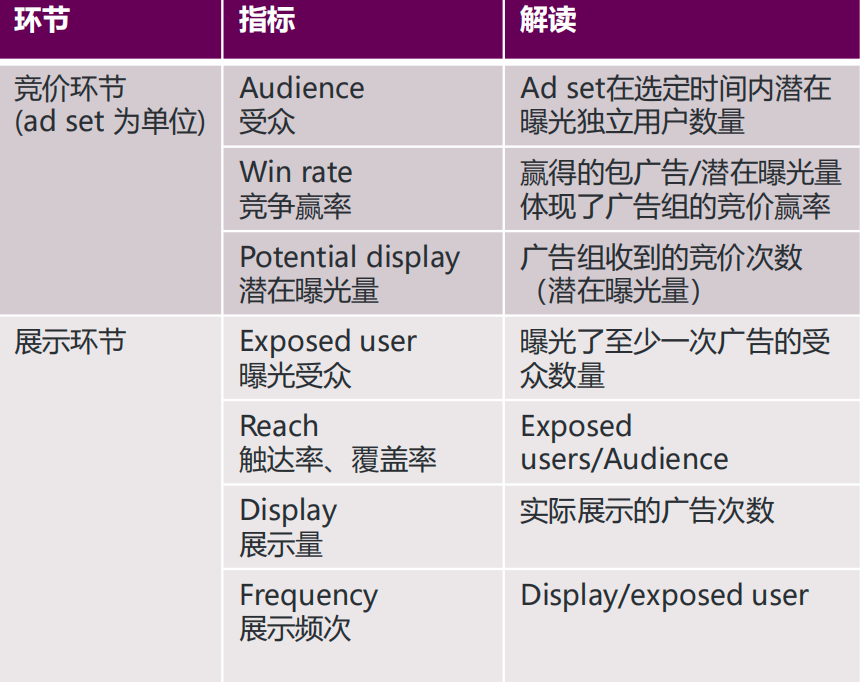
关注指标:Audience, exposed user, reach, display, clicks, ctr, CPC, win rate
用户点击广告后回到网站,进一步浏览和转化
与营销内容一致的网站产品/服务,良好的运营与服务确保流量有效的承接
关注指标:
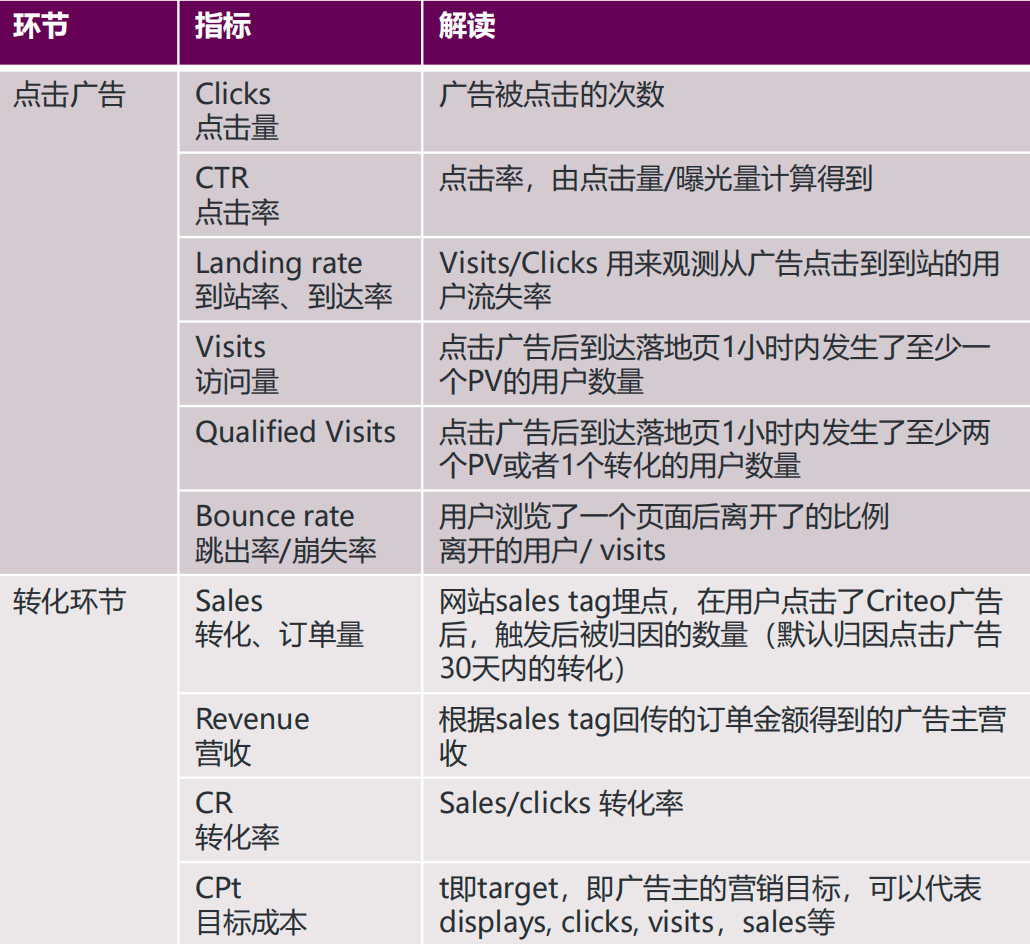
Landing rate, visits, bounce rate, sales, revenue, CR, CPt, ROAS
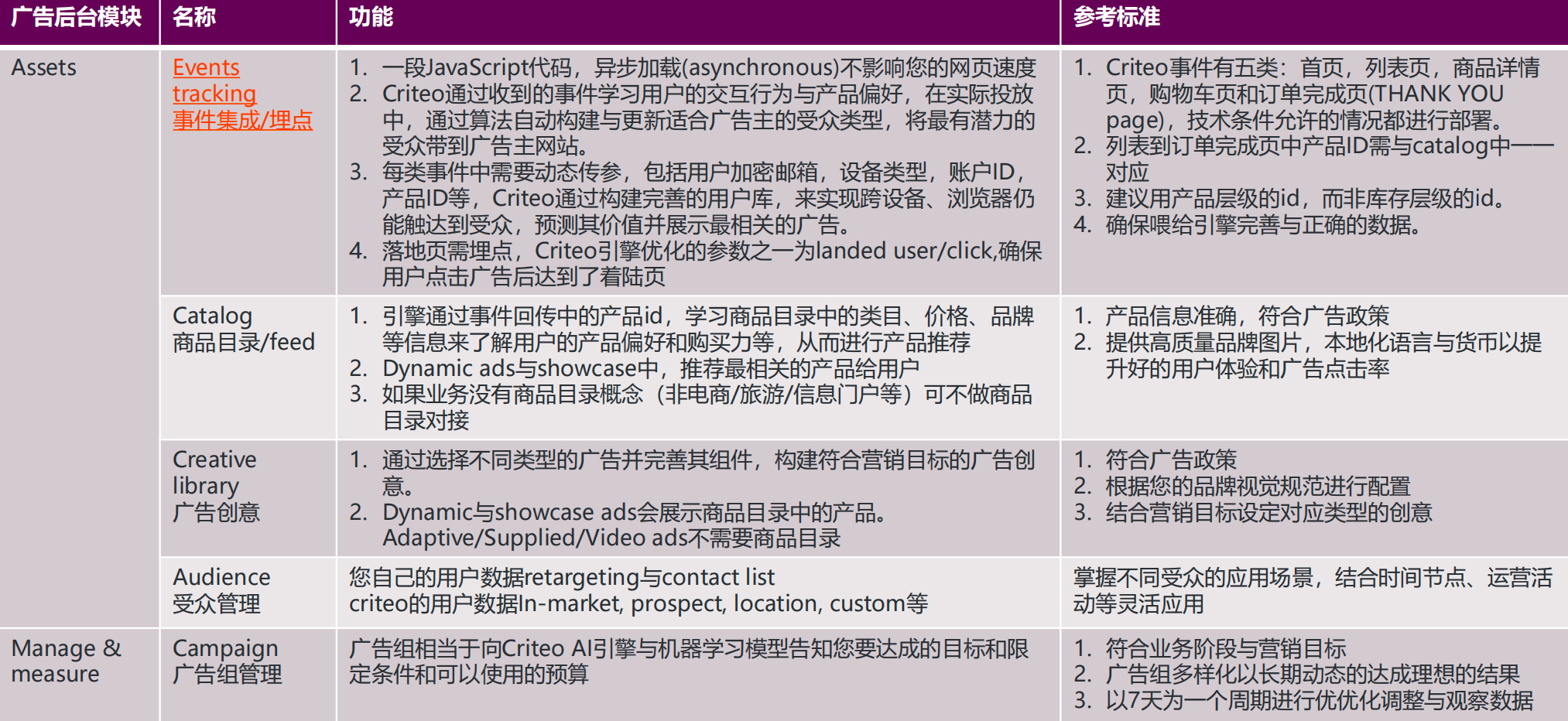
异步加载:https://www.jianshu.com/p/7105c1983384
async 属性表示异步执行引入的 JavaScript,与 defer 的区别在于,如果已经加载好,就会开始执行,无论此刻是 HTML 解析阶段还是 DOMContentLoaded 触发(HTML解析完成事件)之后。需要注意的是,这种方式加载的 JavaScript 依然会阻塞 load 事件。换句话说,async-script 可能在 DOMContentLoaded 触发之前或之后执行,但一定在 load 触发之前执行。
从上一段也能推出,多个 async-script 的执行顺序是不确定的,谁先加载完谁执行。值得注意的是,向 document 动态添加 script 标签时,async 属性默认是 true。
账户结构:
Account
- 在Criteo,如果您只跑再营销广告,投放全球,可以按美洲,欧洲,亚洲三个数
据中心开三个账户,在ad set 层级设置投放国家以达到区分的目的。
- 如果您希望投放再营销与拉新的广告,使用完整的Criteo广告服务,需要区分国
家开广告账户,首次合作,可以先从流量最大的意向国家开户。
- 如果您既有app也有网页端,如果app和web的产品id,库存信息,商品价格用
的是一套,可以在同一个账户中投放app和网页端,如果App端的业务独立于网
页端,有不同的产品ID,库存信息,价格等信息,需要单独开app的账户。
Campaign(What)
- 设置您的业务目标goal,用作数据报告中区分campaign使用,可选acquisition(拉新)
与retention(再营销)
- Campaign name,建议填写账户国家,goal,objective的信息
- Objective:营销目标,对应不同的ad set 功能、人群与设定,可选awareness,
consideration与conversion
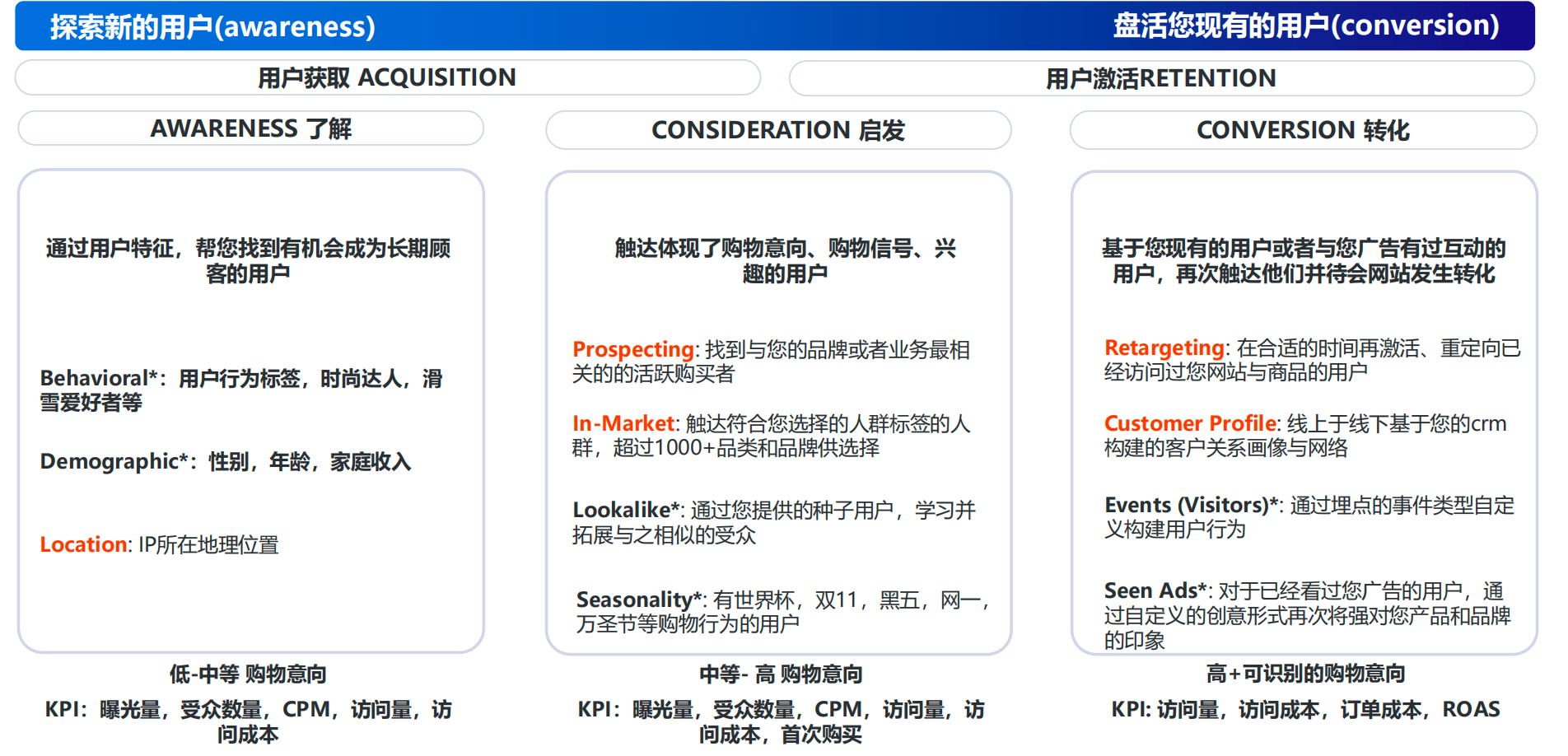
标需要联系Criteo客户经理走加白名单/Criteo内部系统设置(部分有锁定预算的要求)
未标的受众类型可直接在Criteo后台自助设置投放
Best Practice:
因为在创建广告组时应避免同一广告组定向的人群有重叠导致内部竞争(竞价为ad set level),因此Retargeting 与similar(prospecting)受众在广告组(ad set)设置时再创建。
2. 建议Retargeting 广告组最多创建两组,以用户访问网站后离开的时间0-60天,60-400天加以区分。为控制成效,投放display 广告,而非video广告
3. 建议Similar audience最多创建四组,以不同的优化目标:visit 或conversion,广告创意类型:display或 者video加以区分(不同广告位)
4. Custom audience In-Market(commerce),Location 与Contact list 在audience – segment的地方新建后得到。在广告组创建时,选择custom audience,来勾选您要定向的segment,勾选后人群间默认是并集的关系(合并人群,通过点击include设定),也可以使用narrow down变更为交集(说明文档)
https://help.criteo.com/kb/guide/en/about-audiences-0EJNOqUqYu/Steps/842036,1680456,1683200
- Spend Limit: 一定要设置,单位与ad set保持一致,日预算 - 金额为广告组日预算之和*150%,月预算和lifetime预算,等于广告组预算之和
Ad set(Whom, where, how, when)
- How – 设置您的有效目标,出价方式和预算,其中Media type – 选择您要展示
的媒体类型,展示类广告还是视频类广告
- Whom – audience 选择您要定向的受众类型
- Where – 设置您的广告展示条件与环境,包括国家,设备,上下文(Context),媒体列表(palcement)等
- When – 设定您要开启广告的时间/或者不设置,手动开启/暂停即可
- Tracking – 如果不需要区分广告样式类型,
Ads 广告创意
- 一个展示类的ad set下面可以跑多组不同类型的ads,测试其效果。
- Media type为video的广告,也可以跑多组不同的video素材,测试素材效果。
- 可以在creative library中提前创建好后,在ad set 创建流程中复用创建好的ads,
也可以在creative library点击launch,将ads关联到ad set
不同投放阶段调整优化内容
常用术语
| Advertiser value | The revenue generated by each product, considering margin (if provided in your product catalog). | |
|---|---|---|
| Assisted sales | The number of sales a given ad set/campaign contributed to (generated displays/clicks) but was not the last touchpoint. The higher the number, the more important is to continue to run that ad set/ campaign to continue to drive increased performance. | |
| Assists per sale | The ratio between the assisted sales that ad set/campaign contributed to vs the sales attributed to that ad set/campaign. | |
| App installs | The number of installations of your app. | |
| Audience | Potential users who could be served an ad. | |
| Average cart | Average revenue generated by a sale. | |
| Bounce rate | The proportion of website visitors leaving after only viewing one page. | |
| Clicks | The number of clicks driven by the ads. | |
| Cost | The overall cost of your ads or video ads. | |
| COS (Cost of sale) | The ratio between the cost generated by the ad set(s) vs. the revenue generated by the sales, figured as a percentage. | |
| COV (Cost of advertiser value) | The ratio between the advertiser value generated by the sales vs. the cost generated by the ad set(s), figured as a percentage. | |
| Cost per install | The amount of money it cost to get one customer’s sale after they’ve installed your app. | |
| CPO (Cost per order) | The amount of money that needs to be spent to get one order or transaction. | |
| CPV (Cost per Visit) | The amount of money spent to get one visit on your website | |
| CPOV (Cost per store visit) | The amount of money spent to get one visit on your physical store | |
| CPM (Cost per mille) | The amount of money spent per thousand displays, available for CPM-based ad sets only. | |
| CTR (Click through rate) | The rate or frequency at which users click through to a landing page from an ad. | |
| CVR (Conversion rate) | The percentage of completed purchases compared to the clicks that occurred. | |
| Displays | The number of times your ads have been shown on a screen. | |
| eCPM (Effective cost per mille) | The amount of money spent per thousand displays. | |
| Exposed users | The number of users who have been served an ad. | |
| Install rate | The percentage of completed app installs compared to the number of clicks. | |
| Omnichannel ROAS (Return on Ad Spend) | The ratio between revenue generated ( both online and offline) and the cost. | |
| Omnichannel revenue | The revenue generated by online and offline sales. | |
| Omnichannel sales | The number of online and offline transactions or conversions resulting from Criteo ads. | |
| Potential displays | The number of display opportunities, or the number of bid requests received. | |
| Post-install sales | The number of times a customer has bought something from you after they’ve installed your app. | |
| Post-install CVR (Conversion rate) | The percentage of users that bought something from you after they’ve installed your app. | |
| Post-install COS (Cost of sale) | The amount of money it cost to get one customer’s sale after they’ve installed your app. | |
| Post-install order value | The average value of a customer’s order after they’ve installed your app. | |
| Post-install CPO (Cost per order) | The amount of money it cost to get one customer’s order after they’ve installed your app. | |
| Post-install ROAS (Return on Ad Spend) | The ratio between the revenue generated and how much you spent to get customers to install your app. | |
| Qualified visits | The number of users on the target website or app for which at least two events or one sale event occurred within the hour following a click. | |
| Reach(曝光,触达率) | Share of potential users who have been served an ad. | Exposed |
| users/Audience | ||
| Revenue | The number of sales one of your campaigns or ad sets contributed to (with clicks or displays) on your site or app. | |
| ROAS (Return on ad spend) | The ratio between the revenue generated and the cost. | |
| Sales | The number of completed e-commerce transactions or purchases. | |
| Sales all | Sales on your website enriched with the estimated performance of non-observable users = it is a modelled metric (all metrics suffixed by “all” are modelled ones). | |
| Store ROAS (Return on Ad Spend) | Store Return on Ad Spend. The ratio between the revenue generated in-store and the cost. | |
| Store revenue | The amount of revenue generated by in-store sales. | |
| Store sales | The number of completed in-store transactions or purchases. | |
| Untracked displays | This is the number of untracked displays. Some displays cannot be tracked because of the display environment (for instance. native banners). | |
| Unviewed displays | The number of ads that have not been viewed. A display that doesn’t meet the viewed display criteria is considered unviewed. | |
| Viewed displays | The number of times at least 50% of the ad appeared for at least 1 second for ads and 2 seconds for video ads, once started. | |
| Win rate | The number of impressions won divided by the total number of impressions that were bid on. |
参考链接:
https://help.criteo.com/kb/guide/en/full-list-of-available-metrics-2K8fTdtDS7/Steps/775874,2417518
https://help.criteo.com/kb/guide/en/about-audiences-0EJNOqUqYu/Steps/842036,1680456,1683200